I am sad to announce that I am ending development of YouTube5. Really this happened months ago, but it’s taken me until now to admit to myself that it is no longer a priority for me, and I am not going to regain the motivation to work on it. YouTube now fully supports HTML5 on all of its videos, so YouTube5 is no longer necessary to avoid Flash. Eliminating Flash was the primary reason I created YouTube5 to begin with, and its other features are not compelling enough for my needs to be worth the time to maintain it. I stopped using YouTube5 on my own computer about a year ago, and haven’t really missed it.
I’m sorry that it has taken me so long to announce this, and I apologize to all those who have been waiting for updates or fixes. YouTube5 is open source, so if anyone wishes to fork it and continue development, feel free. I will gladly link to a new site if someone wishes to take over maintenance.
Thank you to all of you who used YouTube5 over the years and offered feedback and suggestions! It’s been a great experience developing it.
Posted in General | Comments Off on Ending Development of YouTube5
I have just released YouTube5 v2.6.8, which fixes the issues many of you have been encountering on YouTube. I want to thank you all for your patience, and I am also very grateful for the many donations I have received in the last few days; knowing how much people appreciate this extension is a huge incentive to fix it quickly.
I do want to apologize that this fix took so long to come out. The main reason for the delay was that I wasn’t aware anything was wrong until a user emailed me a couple days ago. This may seem surprising given how many of you commented on this blog letting me know it was broken, but to be perfectly honest this blog receives so many comments that I turned off notifications long ago, and I hadn’t checked it in a while. This communication breakdown has made me realize I need to make some changes around here to prevent future such occurrences:
From now on, comments, suggestions, bug reports, etc. should be posted to one of two places:
These two communication channels should be far more manageable than one massive set of comments on a single page. I also post updates to my Twitter account whenever YouTube5 is updated, so feel free to follow me if you would like to be notified.
Again, I apologize that I have been unable to keep up with the number of comments posted to this site. I deeply appreciate all the reports, and hopefully using these new channels I will be able to actually respond to them.
Posted in General | Comments Off on YouTube5 v2.6.8
Several people have been noticing that YouTube5 now only offers a 720p option as the maximum resolution for streaming from YouTube. I’ve been aware of this issue for a while, and while I would love to fix it, it is sadly due to some architectural changes on YouTube’s end that make things very difficult.
Before about a month ago, YouTube offered 1080p and higher resolutions as self-contained audio/video streams in the MP4 container. Now, they only offer 720p and lower resolution streams. The reason for the change is that YouTube has adopted a new technology called MPEG-DASH which they now use exclusively for higher resolution video. MPEG-DASH splits the audio and video streams into separate files that are downloaded individually and combined only when played back by the browser, using a new HTML5 API called Media Source Extensions. The advantage of this system is that the player can now quickly and dynamically switch between different resolutions and qualities of video and audio streams to provide uninterrupted playback when the user’s bandwidth drops, just as Netflix or Hulu does.
The problem with this system is that Media Source Extensions are not currently supported by Safari. You can see this in action if you enable the HTML5 beta on YouTube and compare the maximum resolutions offered by the HTML5 player in Chrome vs. Safari. In Safari, even Google’s player tops out at 720p.
What this means for YouTube5
Until Safari gains support for Media Source Extensions, YouTube5 will be limited to 720p video (unless YouTube reenables their old higher resolution streams, which I doubt they will do). A Chrome version of YouTube5 is coming soon (I’ve been testing it for a few weeks now), and if I have time I may build in support for MPEG-DASH streams, allowing Chrome users to see the higher resolution videos. Sadly, that won’t help Safari any. I still prefer Safari to Chrome as my general purpose browser, and I am disappointed to see it begin to lag behind Chrome in standards adoption after Google’s Blink fork of WebKit. But for now, there is nothing I can do about it.
Posted in General | Comments Off on YouTube5 and 1080p on YouTube
Its taken over a month for me to finally find time to fix YouTube5, during which I have had time to fully remember why I hate the default player. But, as of now, it is fully working again! You can now watch Vevo videos and all YouTube videos without flash even installed. Most people have probably stopped using this plugin in the meantime, but hopefully many of you will reactivate it and continue using it.
For future reference, if you would like to receive notifications when YouTube5 is updated, follow me on Twitter @verticalforest.
Posted in General | Comments Off on YouTube5 v2.6.2
Its finally here, the most requested feature for YouTube5: keyboard controls. Its taken me a long time to get around to implementing these correctly, but its done now.
The available controls are:
Space: Play/Pause
Left arrow: Back 5 seconds
Right arrow: Forward 5 seconds
F: Fullscreen
P: Popout
Also included in this update is a rewrite of the fullscreen interface. YouTube5 no longer uses the Apple provided full screen controls, which allows it to look much nicer and function more reliably. And yes, keyboard controls work in fullscreen mode too. Enjoy the update!
Posted in General | Comments Off on YouTube5 Version 2.5 – Keyboard Controls
Many thanks to dlh for submitting a fix for changes YouTube made a few days ago that broke the extension. I have just released version 2.4.1 which should fix all the issues.
Posted in General | Comments Off on YouTube5 Version 2.4.1 Bugfix for YouTube
Although the availability of my time to work on this project is sporadic at best, I do occasionally find time to make major upgrades. On that note, I have just release YouTube5 version 2.4.0, which includes several fixes and one major improvement. It fixes Vimeo support (although I am still encountering issues with some videos that I cannot figure out), and all the artwork in the player is now vector based (SVG), so it will look better when scaled up.
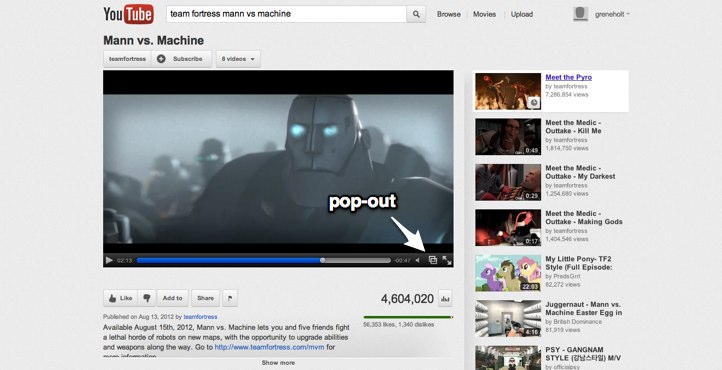
The major new feature is Pop-Out. Just click this icon:
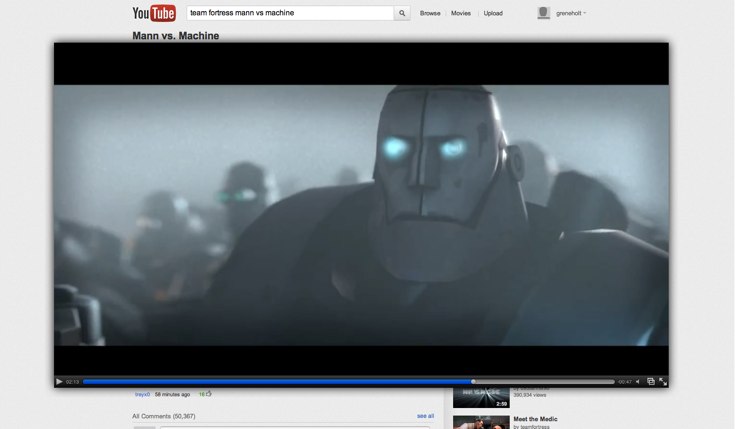
And the player will pop out of the page and expand to fill most (or all) of the page.
Best of all, this will work on any website, not just YouTube.com. Tired of small embedded videos on your Facebook feed? Just pop them out to view them at a larger size, but without needing to go fullscreen.
Posted in General | Comments Off on YouTube5 Version 2.4.0 – Now with Pop-Out
Apparently I have not documented the process of downloading videos with YouTube5 well enough, because questions about how to do so are extremely common. Well, I finally broke down and made a video tutorial about how to do it, see below.
Posted in General | Comments Off on Downloading Videos with YouTube5
I have just released a new version of YouTube5, which I’ve had in a half-completed state for several months now but never had time to polish up and release. The biggest change in this version is that the player is no longer embedded in an iFrame, so it lives directly in the top level page. The main advantages of this change are simplicity and reliability. Previously there were issues with videos on YouTube channel pages continuing to play in the background after a new video was loaded, probably because Safari did not properly garbage collect the contents of the iFrame once it was no longer part of the page.
Technical details aside, this update should improve compatibility with several sites and other extensions. In particular, YouTube5 now properly integrates with clea.nr (formerly A Cleaner YouTube). It should also cooperate with videos in lightboxes and popups better. I’ve also discovered that it fixes videos in private browsing mode.
However, moving the player directly into the page has one downside: it is now affected by the site’s CSS styling. I have tried to minimize any problems that could result from this by using a reset stylesheet on all the elements inside the player, but there may still be problems with some websites. If you encounter any, please let me know and I will try to fix them.
The only other change in this version is the addition of an overlay that displays the video title and author before it is played, similar to what the default YouTube and Vimeo players already do.
Posted in General | Comments Off on YouTube5 Version 2.3.0
I apologize to everyone for the recent delay on updating YouTube5 after changes made by YouTube broke it last Wednesday. I learned of the issue late Wednesday night, but was unable to fix it before I left Thursday to be out of town for several days without a computer. I’m back now however, and thanks to a fix submitted by vinnyrose, YouTube5 is fully functional again! Please let me know if there are any issues with the new version.
Update: It looks like I spoke too soon. The original fix broke support for embedded videos; I have now released version 2.2.7 which should get everything working again.
Posted in General | Comments Off on YouTube5 Version 2.2.6